Quick Answer
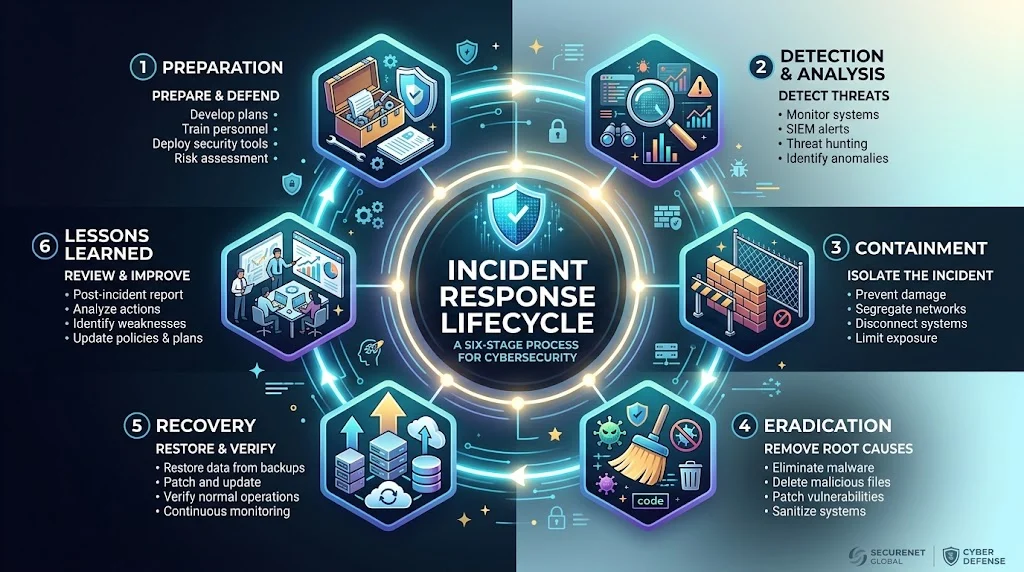
The incident response phases are the structured steps organizations use to prepare for, detect, contain, eradicate, and recover from security incidents, followed by lessons learned. A common framework is preparation, detection and analysis, containment, eradication, recovery, and post-incident activity.
Top alternatives: incident response lifecycle, security incident process, cyber incident stages, incident handling process, security response steps
A security incident can turn a normal workday into complete chaos in minutes. One suspicious login becomes a potential breach, an infected computer starts spreading trouble, or an employee reports a strange email that nobody expected. That is where incident response phases become important. Instead of reacting randomly, security teams follow a structured process that helps them understand what happened, limit the damage, remove the threat, restore normal operations, and learn from the event.
These steps matter for cybersecurity teams, IT departments, businesses, students, and anyone learning how organizations handle security incidents. The exact terminology can differ between frameworks, but the overall goal stays similar: respond quickly, communicate clearly, preserve useful evidence, and recover safely. Think of it as having a playbook ready before the digital fire alarm starts ringing.
Preparation Phase
- Build an incident response plan.
Example: Use this when an organization wants a documented process before an incident happens.
Meaning: A written plan gives the team a clear starting point during an emergency. - Define security roles.
Example: Use this when deciding who handles technical investigation, communications, and management decisions.
Meaning: Clear responsibilities reduce confusion during an incident. - Create an incident response team.
Example: Use this when an organization assigns people to coordinate security incidents.
Meaning: A dedicated team makes response efforts more organized. - Maintain contact information.
Example: Use this when teams need current contact details for internal and external support.
Meaning: Accurate contacts make urgent communication faster. - Prepare communication procedures.
Example: Use this when deciding how incident updates should be shared.
Meaning: Communication procedures help prevent confusion and misinformation. - Document important systems.
Example: Use this when identifying which servers, applications, and services are business-critical.
Meaning: Knowing the environment helps teams prioritize response actions. - Maintain security tools.
Example: Use this when checking whether monitoring and defensive systems are ready.
Meaning: Reliable tools improve the team’s ability to identify and investigate problems. - Train response personnel.
Example: Use this when preparing employees for simulated security incidents.
Meaning: Training helps people respond confidently instead of improvising. - Run tabletop exercises.
Example: Use this when a team practices responding to a fictional security incident.
Meaning: Exercises expose weaknesses before a real event occurs. - Establish escalation rules.
Example: Use this when determining when an incident needs senior management involvement.
Meaning: Escalation rules help serious events receive appropriate attention. - Prepare evidence-handling procedures.
Example: Use this when an organization needs to preserve potentially useful incident information.
Meaning: Proper procedures help protect the reliability of evidence. - Review existing risks.
Example: Use this when identifying likely threats before planning defenses.
Meaning: Risk awareness helps teams prepare for realistic scenarios. - Create backup procedures.
Example: Use this when preparing for incidents that could disrupt systems or data.
Meaning: Backups can support safer recovery after an incident. - Test response capabilities.
Example: Use this when checking whether the incident process works as expected.
Meaning: Testing reveals gaps that may otherwise appear during a crisis. - Keep the plan updated.
Example: Use this when systems, employees, or security requirements change.
Meaning: An outdated plan can become ineffective when it is actually needed.
Detection And Analysis Phase
- Monitor for suspicious activity.
Example: Use this when security teams review alerts from monitoring systems.
Meaning: Monitoring helps identify potentially harmful activity. - Validate the alert.
Example: Use this when a security system generates a notification that may be a false alarm.
Meaning: Validation determines whether further investigation is necessary. - Identify the affected system.
Example: Use this when investigating where suspicious activity occurred.
Meaning: Finding affected assets helps define the scope of the incident. - Determine what happened.
Example: Use this when analysts investigate the initial signs of an incident.
Meaning: Understanding the event guides the rest of the response. - Establish an incident timeline.
Example: Use this when analysts organize known events in chronological order.
Meaning: A timeline can reveal how an incident developed. - Assess the scope.
Example: Use this when determining whether one device or multiple systems are involved.
Meaning: Scope assessment helps teams choose an appropriate response. - Collect relevant information.
Example: Use this when analysts gather logs, alerts, and other useful records.
Meaning: Relevant information supports a more accurate investigation. - Prioritize the incident.
Example: Use this when several security alerts compete for attention.
Meaning: Prioritization helps teams focus on incidents with greater potential impact. - Classify the incident.
Example: Use this when determining whether an event involves malware, unauthorized access, data exposure, or another category.
Meaning: Classification gives the incident a useful investigative context. - Identify affected accounts.
Example: Use this when suspicious activity appears connected to user accounts.
Meaning: Account identification can help establish the incident’s scope. - Determine business impact.
Example: Use this when assessing how an incident affects operations.
Meaning: Impact assessment helps guide response priorities. - Record investigation findings.
Example: Use this when analysts document what they discover.
Meaning: Documentation creates a useful record for response and later review. - Separate facts from assumptions.
Example: Use this when early information is incomplete.
Meaning: Distinguishing evidence from guesses reduces premature conclusions. - Escalate serious findings.
Example: Use this when evidence suggests a significant security event.
Meaning: Serious incidents may require additional expertise and decision-making. - Decide whether it is an incident.
Example: Use this when an alert has been investigated but its significance remains uncertain.
Meaning: This decision determines whether the formal response process continues.
Containment Phase
- Limit the incident’s spread.
Example: Use this when suspicious activity appears to be affecting multiple systems.
Meaning: Containment aims to prevent the situation from becoming larger. - Isolate affected systems.
Example: Use this when a device may be involved in a security incident.
Meaning: Isolation can help reduce further impact while investigation continues. - Protect critical services.
Example: Use this when deciding which business systems need immediate protection.
Meaning: Prioritizing critical services can reduce operational disruption. - Restrict affected accounts.
Example: Use this when an account appears compromised or misused.
Meaning: Limiting access can help prevent additional unauthorized activity. - Segment affected network areas.
Example: Use this when teams need to reduce communication between affected and unaffected systems.
Meaning: Segmentation can help limit potential spread. - Preserve relevant evidence.
Example: Use this before making changes that could remove useful investigative information.
Meaning: Evidence preservation supports accurate analysis. - Apply temporary controls.
Example: Use this when a permanent fix is not immediately available.
Meaning: Temporary controls can reduce risk while a longer-term solution is prepared. - Coordinate containment decisions.
Example: Use this when technical actions could affect business operations.
Meaning: Coordination helps balance security needs with operational requirements. - Document containment actions.
Example: Use this when recording what the response team changes.
Meaning: Documentation creates an audit trail and supports later review. - Monitor for continued activity.
Example: Use this after containment measures have been applied.
Meaning: Monitoring helps determine whether the incident remains active. - Protect unaffected systems.
Example: Use this when some systems have not shown signs of compromise.
Meaning: Preventive measures can reduce the chance of additional impact. - Confirm containment effectiveness.
Example: Use this when checking whether the chosen controls actually reduced the incident.
Meaning: Verification prevents teams from assuming the problem is contained too early. - Coordinate with stakeholders.
Example: Use this when containment affects business teams or customers.
Meaning: Stakeholder coordination keeps important parties informed. - Reassess the scope.
Example: Use this when new evidence appears during containment.
Meaning: Scope may change as the investigation develops. - Prepare for eradication.
Example: Use this when immediate spread has been controlled.
Meaning: Containment creates a safer point for removing the underlying cause.
Eradication Phase
- Identify the root cause.
Example: Use this when investigators need to understand how the incident began.
Meaning: Root-cause analysis helps prevent the same weakness from causing another incident. - Remove malicious components.
Example: Use this when confirmed harmful software or unauthorized components are found.
Meaning: Removing the threat helps restore a trustworthy environment. - Eliminate unauthorized access.
Example: Use this when investigators identify inappropriate access mechanisms.
Meaning: Removing unauthorized access helps close the path used by the incident. - Address exploited weaknesses.
Example: Use this when an incident reveals a security vulnerability.
Meaning: Fixing the weakness reduces the chance of recurrence. - Reset affected credentials.
Example: Use this when account credentials may have been exposed.
Meaning: Credential changes can help prevent continued unauthorized access. - Remove persistence mechanisms.
Example: Use this when an investigation identifies ways unwanted activity could remain active.
Meaning: Removing persistence helps ensure the threat does not return through the same path. - Update vulnerable software.
Example: Use this when outdated software contributed to the incident.
Meaning: Updates can address known security weaknesses. - Strengthen security controls.
Example: Use this when existing defenses were insufficient.
Meaning: Stronger controls can reduce future exposure. - Review compromised accounts.
Example: Use this when user accounts may have been affected.
Meaning: Account reviews help identify remaining risks. - Verify threat removal.
Example: Use this after remediation activities are completed.
Meaning: Verification helps confirm that the identified threat has actually been addressed. - Document remediation work.
Example: Use this when recording what was changed to remove the threat.
Meaning: Documentation supports accountability and future learning. - Review related systems.
Example: Use this when the same weakness could exist elsewhere.
Meaning: Checking similar systems helps prevent repeated compromise. - Coordinate technical remediation.
Example: Use this when several teams need to fix different parts of the environment.
Meaning: Coordination makes remediation more consistent. - Recheck security assumptions.
Example: Use this when the incident reveals unexpected weaknesses.
Meaning: Reviewing assumptions can uncover overlooked risks. - Prepare for recovery.
Example: Use this when the threat has been addressed sufficiently for restoration activities to begin.
Meaning: Eradication creates the foundation for returning systems to normal operation.
Recovery Phase
- Restore affected systems.
Example: Use this when systems need to return to normal service after remediation.
Meaning: Restoration brings business operations back online. - Use trusted recovery sources.
Example: Use this when rebuilding systems after an incident.
Meaning: Trusted sources help avoid reintroducing known problems. - Test restored systems.
Example: Use this before returning systems fully to production.
Meaning: Testing checks whether systems work correctly and securely. - Monitor restored assets.
Example: Use this after systems return to service.
Meaning: Increased monitoring can help identify recurring issues. - Restore business operations gradually.
Example: Use this when bringing several affected services back online.
Meaning: A controlled restoration can reduce additional disruption. - Verify security controls.
Example: Use this when checking whether protective measures are functioning after recovery.
Meaning: Verification helps ensure restored systems are not unnecessarily exposed. - Confirm system integrity.
Example: Use this when checking whether recovered systems are trustworthy.
Meaning: Integrity checks support safer restoration. - Communicate recovery progress.
Example: Use this when stakeholders need updates about service restoration.
Meaning: Clear updates help manage expectations. - Track remaining issues.
Example: Use this when some problems continue after initial recovery.
Meaning: Tracking keeps unresolved risks visible. - Prioritize critical services.
Example: Use this when not every system can be restored simultaneously.
Meaning: Prioritization helps essential operations return sooner. - Review recovery decisions.
Example: Use this after systems have been restored.
Meaning: Reviewing decisions can identify better approaches for future incidents. - Confirm normal functionality.
Example: Use this when business teams need assurance that restored services work as expected.
Meaning: Functional confirmation supports a safe return to normal operations. - Continue heightened monitoring.
Example: Use this during the period immediately after recovery.
Meaning: Additional observation can reveal lingering problems. - Close temporary controls carefully.
Example: Use this when emergency restrictions are no longer required.
Meaning: Careful removal prevents security gaps during normalization. - Declare recovery complete.
Example: Use this when required systems and controls have been restored and verified.
Meaning: A formal completion point helps close the operational response.
Post-Incident Review
- Conduct a lessons-learned meeting.
Example: Use this after the immediate incident has been resolved.
Meaning: The meeting helps teams understand what worked and what did not. - Review the timeline.
Example: Use this when reconstructing how the incident unfolded.
Meaning: Timeline review can reveal delays and missed opportunities. - Identify response gaps.
Example: Use this when evaluating weaknesses in the response process.
Meaning: Gaps provide targets for improvement. - Review communication.
Example: Use this when assessing how effectively information moved between teams.
Meaning: Communication quality can strongly affect incident response. - Evaluate containment speed.
Example: Use this when reviewing how quickly the incident was controlled.
Meaning: Speed analysis can highlight process improvements. - Assess recovery effectiveness.
Example: Use this when reviewing whether restoration went smoothly.
Meaning: Recovery analysis helps improve future restoration planning. - Update the response plan.
Example: Use this when lessons from an incident reveal outdated procedures.
Meaning: Updating the plan keeps future responses relevant. - Document lessons learned.
Example: Use this when preserving knowledge from the incident.
Meaning: Written lessons help other teams benefit from the experience. - Track corrective actions.
Example: Use this when assigning improvements after the incident.
Meaning: Tracking turns lessons into measurable changes. - Review security controls.
Example: Use this when determining whether defenses need improvement.
Meaning: Control reviews can reduce the likelihood of similar incidents. - Update training materials.
Example: Use this when an incident exposes employee knowledge gaps.
Meaning: Updated training can address recurring human-related risks. - Share appropriate findings.
Example: Use this when useful lessons can benefit relevant teams.
Meaning: Sharing knowledge helps strengthen organizational resilience. - Measure response performance.
Example: Use this when reviewing metrics such as detection and recovery time.
Meaning: Measurements help teams track improvement. - Prioritize future improvements.
Example: Use this when several weaknesses are discovered.
Meaning: Prioritization helps organizations focus on the most important changes. - Close the incident formally.
Example: Use this when all required response and review activities are complete.
Meaning: Formal closure confirms that the incident lifecycle has been completed.
Incident Response Team Responses
- Stay calm and follow the plan.
Example: Use this when team members feel overwhelmed during an incident.
Meaning: It encourages disciplined decision-making. - Assign clear ownership.
Example: Use this when several people are working on the same incident.
Meaning: Ownership prevents duplicated or neglected tasks. - Keep communication concise.
Example: Use this when updates need to reach busy stakeholders quickly.
Meaning: Concise communication improves understanding during stressful events. - Record decisions as they happen.
Example: Use this when responders are making important operational choices.
Meaning: Recording decisions preserves useful context for later review. - Avoid unnecessary changes.
Example: Use this when teams are tempted to modify systems without a clear reason.
Meaning: Controlled actions reduce accidental complications. - Verify important information.
Example: Use this when reports come from multiple sources.
Meaning: Verification reduces mistakes caused by incomplete information. - Escalate when necessary.
Example: Use this when an incident exceeds the team’s defined thresholds.
Meaning: Timely escalation brings additional resources when needed. - Protect evidence.
Example: Use this when investigating an incident that may require detailed analysis.
Meaning: Evidence can help explain what happened. - Prioritize business impact.
Example: Use this when deciding which affected systems deserve immediate attention.
Meaning: Business impact helps guide practical response priorities. - Use established procedures.
Example: Use this when responders need guidance during an unfamiliar incident.
Meaning: Procedures provide consistency under pressure. - Keep stakeholders informed.
Example: Use this when business leaders need status updates.
Meaning: Regular communication reduces uncertainty. - Challenge assumptions respectfully.
Example: Use this when a proposed explanation lacks supporting evidence.
Meaning: Healthy questioning improves investigative accuracy. - Review actions before execution.
Example: Use this when a technical change could have significant consequences.
Meaning: A quick review can prevent avoidable mistakes. - Coordinate across teams.
Example: Use this when security, IT, legal, communications, or management teams are involved.
Meaning: Collaboration helps create a coordinated response. - Learn after the incident.
Example: Use this when the team finishes immediate response work.
Meaning: Every incident can provide information for improving future readiness.
Common Incident Response Mistakes
- Waiting too long to investigate.
Example: Use this when an organization ignores an unusual security alert.
Meaning: Delays can allow an incident to grow. - Skipping preparation.
Example: Use this when a company creates a response process only after an incident begins.
Meaning: Lack of preparation can make emergency decisions slower. - Ignoring false-positive patterns.
Example: Use this when teams repeatedly dismiss alerts without proper review.
Meaning: Too many ignored alerts can hide genuine incidents. - Failing to define responsibilities.
Example: Use this when everyone assumes someone else is handling the incident.
Meaning: Unclear ownership creates response delays. - Making uncoordinated changes.
Example: Use this when responders modify systems without communicating with the team.
Meaning: Uncoordinated actions can complicate investigation and recovery. - Forgetting documentation.
Example: Use this when teams focus entirely on technical actions.
Meaning: Missing records make later analysis harder. - Ignoring business priorities.
Example: Use this when technical decisions overlook critical operations.
Meaning: Response should consider both security and business impact. - Communicating too vaguely.
Example: Use this when stakeholders receive unclear incident updates.
Meaning: Vague communication can increase confusion. - Overlooking similar systems.
Example: Use this when one affected asset has related systems elsewhere.
Meaning: Similar weaknesses may create additional exposure. - Stopping monitoring too soon.
Example: Use this when teams assume the incident is finished immediately after recovery.
Meaning: Continued observation can reveal lingering problems. - Skipping the post-incident review.
Example: Use this when teams close an incident without analyzing it.
Meaning: Skipping review wastes an opportunity to improve. - Treating every incident identically.
Example: Use this when teams use the same response regardless of severity.
Meaning: Different incidents require appropriately scaled responses. - Relying on assumptions.
Example: Use this when responders decide what happened without sufficient evidence.
Meaning: Assumptions can lead investigations in the wrong direction. - Keeping outdated procedures.
Example: Use this when response plans no longer match the organization’s environment.
Meaning: Old procedures may fail during modern incidents. - Ignoring lessons learned.
Example: Use this when organizations identify improvements but never implement them.
Meaning: Unused lessons allow the same weaknesses to remain.
Incident Response Best Practices
- Prepare before an incident.
Example: Use this when building an organizational security program.
Meaning: Preparation makes response more predictable. - Keep procedures accessible.
Example: Use this when responders need quick access to the response plan.
Meaning: Easy access saves time during an incident. - Practice regularly.
Example: Use this when testing whether employees understand their responsibilities.
Meaning: Practice builds familiarity with emergency procedures. - Prioritize critical assets.
Example: Use this when deciding what needs the strongest response attention.
Meaning: Critical assets often deserve faster protection. - Maintain reliable monitoring.
Example: Use this when improving detection capabilities.
Meaning: Monitoring helps teams identify unusual activity. - Use clear escalation criteria.
Example: Use this when defining when incidents require additional support.
Meaning: Clear thresholds make escalation more consistent. - Preserve useful evidence.
Example: Use this when conducting an investigation.
Meaning: Good evidence can support accurate conclusions. - Document important actions.
Example: Use this throughout an incident.
Meaning: Documentation creates a reliable response record. - Coordinate communication.
Example: Use this when multiple departments are involved.
Meaning: Coordinated communication keeps everyone aligned. - Review response metrics.
Example: Use this when evaluating how effectively a team responded.
Meaning: Metrics help identify measurable improvements. - Update security controls.
Example: Use this after identifying weaknesses.
Meaning: Improved controls can reduce future risk. - Test recovery procedures.
Example: Use this before a real incident occurs.
Meaning: Testing can reveal recovery problems in advance. - Keep stakeholders informed.
Example: Use this during significant incidents.
Meaning: Timely updates help stakeholders make informed decisions. - Turn lessons into actions.
Example: Use this after completing a post-incident review.
Meaning: Practical improvements are more valuable than lessons that remain on paper. - Continuously improve the process.
Example: Use this as part of an ongoing security program.
Meaning: Incident response should evolve as threats and environments change.
Simple Incident Response Lifecycle
- Prepare first.
Example: Use this when explaining the lifecycle to a beginner.
Meaning: Teams need plans, people, tools, and procedures before incidents happen. - Detect the problem.
Example: Use this when explaining how suspicious activity enters the response process.
Meaning: Detection identifies events that may require investigation. - Analyze what happened.
Example: Use this when determining whether an alert represents a genuine incident.
Meaning: Analysis establishes facts, scope, and impact. - Contain the incident.
Example: Use this when explaining how teams limit damage.
Meaning: Containment aims to prevent additional spread or impact. - Remove the cause.
Example: Use this when describing remediation.
Meaning: Eradication addresses the underlying threat or weakness. - Restore normal operations.
Example: Use this when explaining recovery.
Meaning: Recovery returns affected systems and services to a trusted state. - Monitor after recovery.
Example: Use this when systems have just returned to normal operation.
Meaning: Monitoring helps identify remaining issues. - Review the incident.
Example: Use this when teaching the final stage of the lifecycle.
Meaning: Review turns experience into future improvements. - Update the playbook.
Example: Use this when lessons reveal outdated procedures.
Meaning: Updating the playbook improves future response. - Train the team again.
Example: Use this when an incident exposes knowledge gaps.
Meaning: Training helps strengthen future readiness. - Measure what happened.
Example: Use this when reviewing response performance.
Meaning: Measurements provide evidence of what can improve. - Fix recurring weaknesses.
Example: Use this when the incident exposes systemic problems.
Meaning: Corrective actions can reduce repeated incidents. - Share appropriate lessons.
Example: Use this when other teams could benefit from the experience.
Meaning: Knowledge sharing improves broader resilience. - Keep improving.
Example: Use this when summarizing the lifecycle as an ongoing process.
Meaning: Security response works best as continuous improvement rather than a one-time project. - Repeat the cycle.
Example: Use this when explaining why preparation begins again after an incident.
Meaning: Every incident can strengthen readiness for the next one.
FAQs
What Are The Incident Response Phases?
They are organized stages used to prepare for, identify, contain, remove, and recover from security incidents, followed by reviewing what happened and improving future readiness.
What Is The First Phase?
Preparation is generally the starting point. It involves creating plans, assigning responsibilities, preparing tools, and training the response team.
What Happens During Detection And Analysis?
Teams investigate alerts, establish what happened, determine scope, assess impact, and decide whether an event qualifies as a security incident.
What Is Containment?
Containment focuses on limiting the incident and preventing further spread or damage while investigation and remediation continue.
What Is Eradication?
Eradication means addressing and removing the underlying threat or weakness responsible for the incident.
Conclusion
Understanding incident response is much easier when you stop thinking of it as one giant cybersecurity emergency and start seeing it as a sequence of manageable decisions. Prepare before anything goes wrong, detect and analyze the event carefully, contain the impact, remove the underlying problem, restore trusted operations, and then learn from what happened. Good response is not about making every decision at lightning speed.
It is about making the right decisions with clear communication, reliable evidence, and defined responsibilities. Whether you are studying cybersecurity, building an IT process, or simply trying to understand security terminology, knowing these stages gives you a strong foundation. Save this guide, share it with your security-minded friends, and use the lifecycle as your quick mental roadmap.
Discover More Related Articles:
- Thank You for Your Response | Better Phrases for Emails In 2026
- AFib With Rapid Ventricular Response | Causes, Symptoms & Treatment In 2026

1 thought on “Incident Response Phases | Preparation, Detection & Recovery In 2026”