Quick Answer
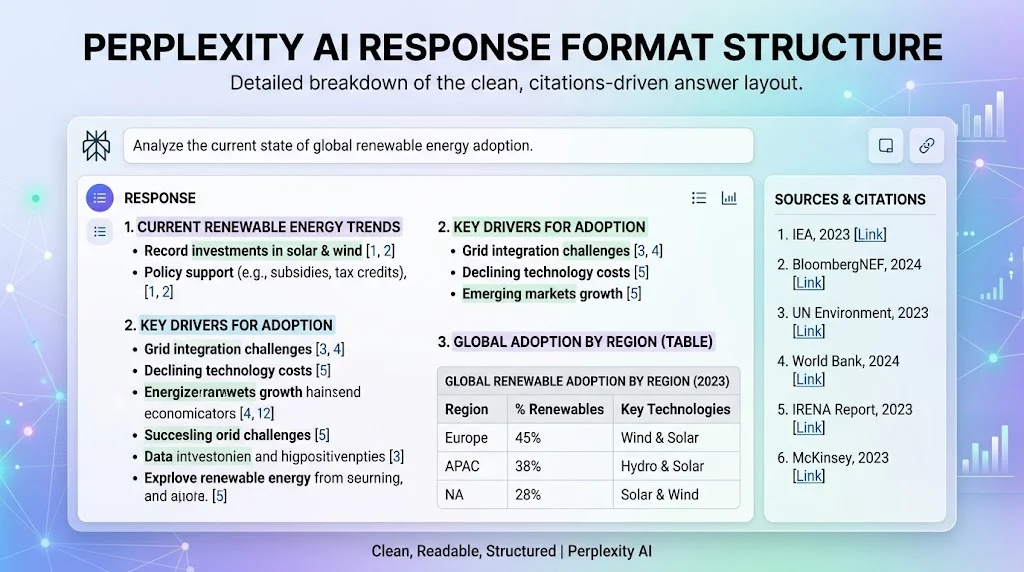
Perplexity AI response format structure refers to the way answers are organized using clear headings, concise explanations, sources, bullet points, tables, and logical sections. A strong structure makes information easier to scan, understand, verify, and reuse.
Top alternatives: AI response structure, answer formatting guide, AI output format, research response structure, structured AI answers
Ever asked an AI a simple question and received a wall of text that somehow made the answer harder to understand? That is where a good response structure makes a huge difference. Whether you are using AI for research, schoolwork, content creation, business tasks, or quick fact-checking, the way information is presented can matter almost as much as the information itself.
A well-organized Perplexity AI response format structure can separate the main answer from supporting details, make sources easier to find, and help readers scan for exactly what they need. Think of it like organizing your desk before starting homework. Everything is still there, but suddenly finding the important stuff becomes much easier. From headings and bullet points to citations, summaries, comparisons, and tables, the right structure can turn a complicated answer into something genuinely useful.
Clear And Simple Responses
- Start with the direct answer first.
Example: Use this when the reader wants a quick explanation before exploring additional details.
Meaning: The main point should appear before supporting information. - Use a short opening summary.
Example: Add two or three sentences explaining the answer before expanding on it.
Meaning: Readers immediately understand the subject and context. - Keep each section focused.
Example: Give each heading one clear purpose instead of mixing unrelated ideas.
Meaning: Focused sections make long answers easier to navigate. - Put important information near the beginning.
Example: Place the key finding before background details.
Meaning: Readers should not have to hunt for the answer. - Use short paragraphs.
Example: Break a large explanation into several smaller paragraphs.
Meaning: Short blocks improve readability on screens. - Explain complicated terms simply.
Example: Define technical language before using it repeatedly.
Meaning: Clear wording makes information accessible to more readers. - Avoid unnecessary repetition.
Example: State an important fact once and develop it instead of repeating the same sentence.
Meaning: Concise writing keeps the response useful. - Answer one question at a time.
Example: Separate multiple parts of a research question into individual sections.
Meaning: Each part receives a clear and complete answer. - Use descriptive headings.
Example: Choose “Key Benefits” instead of a vague heading like “More Information.”
Meaning: Specific headings tell readers what they will find. - Finish with a useful takeaway.
Example: End a long explanation with the most important practical point.
Meaning: Readers leave with a clear understanding of the subject. - Match the detail to the question.
Example: Give a short answer to a simple factual question and more context for complex research.
Meaning: Response length should serve the user’s intent. - Make scanning easy.
Example: Use headings, lists, and spacing throughout a lengthy answer.
Meaning: Readers can quickly locate relevant information. - Use consistent formatting.
Example: Keep heading styles and list patterns consistent from beginning to end.
Meaning: Consistency creates a predictable reading experience. - Separate facts from explanations.
Example: State a documented fact first and then explain why it matters.
Meaning: Readers can distinguish evidence from interpretation. - Keep the final answer purposeful.
Example: Remove sections that do not help answer the original question.
Meaning: Every part of the response should have a reason to exist.
Research-Focused Responses
- Lead with the research finding.
Example: Start with the main conclusion before discussing individual sources.
Meaning: Readers understand the result immediately. - Group related evidence together.
Example: Put studies about the same topic under one heading.
Meaning: Related evidence becomes easier to compare. - Identify important sources.
Example: Mention which source provides the strongest primary evidence.
Meaning: Readers can understand where major claims originate. - Distinguish primary and secondary sources.
Example: Separate an original study from an article discussing that study.
Meaning: Source types have different evidentiary roles. - Include publication dates when relevant.
Example: Add dates when researching rapidly changing technology or current events.
Meaning: Readers can judge how recent the information is. - Compare conflicting findings.
Example: Explain when two credible sources reach different conclusions.
Meaning: Research can contain legitimate disagreement. - Explain the research context.
Example: Mention the population or conditions studied when summarizing research.
Meaning: Context prevents overgeneralizing findings. - Avoid treating every source equally.
Example: Give greater attention to authoritative primary sources than weak commentary.
Meaning: Source quality affects how evidence should be interpreted. - Summarize evidence in plain language.
Example: Explain a technical study in everyday terms after presenting its finding.
Meaning: Readers can understand research without specialized knowledge. - Use evidence-based comparisons.
Example: Compare two technologies using documented features and published information.
Meaning: Structured comparisons make research easier to evaluate. - Mention important limitations.
Example: Explain when a study has a small sample or narrow scope.
Meaning: Limitations help readers interpret evidence responsibly. - Keep claims traceable.
Example: Place a citation close to the statement it supports.
Meaning: Readers can verify individual claims more easily. - Separate established facts from open questions.
Example: Create different sections for confirmed findings and unresolved issues.
Meaning: Readers can see where uncertainty remains. - Use a research summary.
Example: Add a brief overview before presenting detailed evidence.
Meaning: Readers get context before entering the deeper discussion. - End with practical implications.
Example: Explain what the research means for someone making a real-world decision.
Meaning: Research becomes easier to apply.
Citation-Friendly Responses
- Put citations close to claims.
Example: Add the source immediately after a factual statement.
Meaning: Readers can identify the supporting evidence without searching. - Prioritize authoritative sources.
Example: Use official organizations or original research for important claims.
Meaning: Stronger sources generally provide more reliable evidence. - Use source titles when useful.
Example: Identify an important report by its actual title.
Meaning: Readers can recognize the source quickly. - Separate source lists from explanations.
Example: Keep detailed source information in a dedicated references section.
Meaning: The main answer remains readable. - Avoid unsupported statistics.
Example: Provide a citation whenever presenting a specific percentage or number.
Meaning: Quantitative claims should be traceable. - Cite changing information.
Example: Include current sources for prices, policies, product specifications, or recent events.
Meaning: Time-sensitive information can become outdated quickly. - Use multiple sources for major claims.
Example: Support an important research conclusion with several credible references.
Meaning: Multiple sources can provide stronger context. - Explain source disagreements.
Example: Note when credible sources provide different estimates.
Meaning: Readers see the uncertainty instead of receiving a falsely simple answer. - Keep citations relevant.
Example: Use a source that directly addresses the claim rather than one that merely mentions the topic.
Meaning: Relevance matters as much as source quantity. - Avoid citation clutter.
Example: Group closely related claims under appropriate supporting references.
Meaning: Too many unnecessary citations can make an answer difficult to read. - Use official documentation when appropriate.
Example: Reference product documentation for technical specifications.
Meaning: First-party information is often the most direct source. - Check dates before citing.
Example: Confirm that a current claim is supported by a recent source.
Meaning: Old information may no longer reflect present conditions. - Make source verification easy.
Example: Provide identifiable source information for important claims.
Meaning: Readers can investigate the evidence themselves. - Avoid presenting weak sources as definitive.
Example: Label opinion pieces or informal discussions appropriately.
Meaning: Source limitations should remain visible. - End with a source-backed summary.
Example: Recap the key findings while retaining supporting citations.
Meaning: The conclusion remains connected to the evidence.
Professional Responses
- Use a formal opening summary.
Example: Begin a business research response with a concise executive summary.
Meaning: Decision-makers can understand the main point quickly. - Organize information by business priority.
Example: Put costs, risks, benefits, and implementation details in separate sections.
Meaning: Professional readers can focus on relevant information. - Use precise language.
Example: Replace vague phrases with specific descriptions and measurable details.
Meaning: Precision reduces confusion. - Separate facts from recommendations.
Example: Present documented information before discussing possible actions.
Meaning: Readers can distinguish evidence from judgment. - Use tables for comparisons.
Example: Compare products using consistent criteria in columns.
Meaning: Tables make structured information easier to scan. - Highlight important risks.
Example: Create a dedicated section for known limitations or concerns.
Meaning: Decision-relevant risks remain visible. - Include assumptions.
Example: State the conditions behind a financial estimate.
Meaning: Readers understand what the conclusion depends on. - Use action-oriented headings.
Example: Use “Implementation Steps” instead of a generic “Next Section.”
Meaning: Clear headings make the document more practical. - Keep recommendations explainable.
Example: Connect each suggested action to documented evidence.
Meaning: Readers can understand why an option was suggested. - Avoid unnecessary slang.
Example: Use professional language in workplace research.
Meaning: Tone should match the audience. - Summarize measurable outcomes.
Example: Present expected results using specific metrics when available.
Meaning: Concrete outcomes are easier to evaluate. - Use consistent terminology.
Example: Refer to the same product or process by one name throughout the response.
Meaning: Consistency prevents misunderstandings. - Make decisions traceable.
Example: Show which evidence supports each major conclusion.
Meaning: Readers can review the reasoning. - Keep executive summaries short.
Example: Condense a long report into several essential points.
Meaning: Busy readers can quickly understand the situation. - End with next steps when appropriate.
Example: Finish a project analysis with practical actions that follow from the findings.
Meaning: The information becomes easier to apply.
Bullet Point Responses
- Use bullets for lists.
Example: Present several benefits as individual bullet points.
Meaning: Separate items become easier to scan. - Keep bullet points concise.
Example: Explain one idea per bullet instead of writing a full paragraph.
Meaning: Concise bullets improve readability. - Start bullets consistently.
Example: Use similar grammatical patterns for each item.
Meaning: Parallel structure makes lists feel organized. - Use bullets for key takeaways.
Example: Summarize five major findings at the end of a research response.
Meaning: Readers can review the most important points quickly. - Avoid huge bullet paragraphs.
Example: Break a long explanation into multiple smaller bullets.
Meaning: Lists should remain easy to scan. - Use nested bullets sparingly.
Example: Add a second level only when supporting details are necessary.
Meaning: Too many levels can become confusing. - Put the most important items first.
Example: List the most relevant findings before minor details.
Meaning: Readers encounter priorities immediately. - Use bullets for steps.
Example: Explain a process using one action per bullet.
Meaning: Sequential information becomes easier to follow. - Use bold lead-ins.
Example: Begin a bullet with a bold category followed by a short explanation.
Meaning: Readers can scan categories quickly. - Keep formatting consistent.
Example: Give each bullet the same basic structure.
Meaning: Consistency improves visual organization. - Do not bullet everything.
Example: Use paragraphs for explanations and bullets for lists.
Meaning: Different formats should serve different purposes. - Use bullets for comparisons.
Example: List the main differences between two approaches.
Meaning: Readers can identify distinctions quickly. - Use bullets for pros and limitations.
Example: Separate advantages from disadvantages under clear labels.
Meaning: Balanced information becomes easier to review. - Use bullets for FAQs.
Example: Present short answers beneath clearly formatted questions.
Meaning: Readers can quickly find specific information. - End lists with a clear takeaway.
Example: Follow a list of findings with one sentence explaining the overall point.
Meaning: Readers understand why the list matters.
Table-Based Responses
- Use tables for direct comparisons.
Example: Compare several products by price, features, and availability.
Meaning: Side-by-side information is easier to evaluate. - Keep table columns focused.
Example: Give each column one specific comparison criterion.
Meaning: Focused columns prevent clutter. - Use descriptive column names.
Example: Label columns “Feature,” “Cost,” and “Key Limitation.”
Meaning: Readers immediately understand the table. - Avoid excessive text inside cells.
Example: Put short phrases rather than full paragraphs into a comparison table.
Meaning: Tables work best with compact information. - Use tables for structured data.
Example: Organize specifications, dates, or measurable attributes into rows.
Meaning: Structured data becomes easier to scan. - Keep units consistent.
Example: Use the same currency or measurement system throughout a table.
Meaning: Consistent units prevent confusion. - Include context outside the table.
Example: Explain an unusual abbreviation before presenting the table.
Meaning: Readers understand the data correctly. - Avoid forcing narrative information into tables.
Example: Explain complex reasoning in paragraphs instead of creating oversized cells.
Meaning: Tables are not ideal for lengthy explanations. - Use one row per item.
Example: Give each product its own row.
Meaning: Individual entries remain easy to compare. - Highlight meaningful differences in wording.
Example: Clearly describe which feature is included or unavailable.
Meaning: Important distinctions remain visible. - Sort information logically.
Example: Arrange entries alphabetically, chronologically, or by the relevant criterion.
Meaning: Logical ordering helps navigation. - Add a short table summary.
Example: Explain the most important pattern after the comparison.
Meaning: Readers receive context without relying only on raw data. - Avoid unnecessarily wide tables.
Example: Limit columns to the criteria that actually matter.
Meaning: Narrower tables are easier to read. - Use tables when precision matters.
Example: Present technical specifications in a consistent grid.
Meaning: Structured formatting reduces ambiguity. - Pair tables with explanations.
Example: Follow a comparison table with a brief interpretation of the differences.
Meaning: Readers get both data and context.
Step-By-Step Responses
- Start with the goal.
Example: Explain what the reader will accomplish before listing instructions.
Meaning: The purpose gives the steps context. - Number sequential actions.
Example: Use numbered steps for a setup process.
Meaning: Readers know which action comes next. - Give one action per step.
Example: Tell the reader to open a setting in one step and select an option in the next.
Meaning: Individual actions are easier to follow. - Mention prerequisites first.
Example: Explain what someone needs before beginning a process.
Meaning: Readers can prepare before starting. - Use direct verbs.
Example: Start instructions with words such as “Open,” “Select,” or “Check.”
Meaning: Action-oriented wording makes instructions clearer. - Explain why a step matters when needed.
Example: Add a short reason after a complicated instruction.
Meaning: Understanding the purpose can prevent mistakes. - Include expected outcomes.
Example: Tell readers what they should see after completing a step.
Meaning: They can verify their progress. - Address common mistakes.
Example: Add a short troubleshooting note after a difficult step.
Meaning: Readers know what to do if something goes wrong. - Avoid skipping transitions.
Example: Explain how one completed step leads into the next.
Meaning: The process feels connected. - Keep instructions in logical order.
Example: Put preparation before execution and verification.
Meaning: Correct sequencing prevents confusion. - Use screenshots or visuals when appropriate.
Example: Add visual guidance for complicated software instructions.
Meaning: Visual references can make unfamiliar steps easier. - End with verification.
Example: Explain how to confirm that the process worked.
Meaning: Readers can check the final result. - Separate optional steps.
Example: Label advanced settings as optional.
Meaning: Beginners can follow the essential path without distractions. - Use warnings carefully.
Example: Identify an action that could delete or overwrite information.
Meaning: Important risks become visible before the action. - Provide a concise recap.
Example: Summarize the completed process in one sentence.
Meaning: Readers can remember the essential workflow.
Comparison Responses
- Define the comparison criteria.
Example: Compare two products based on price, features, support, and limitations.
Meaning: Clear criteria make comparisons meaningful. - Give both options equal descriptive space.
Example: Explain the important characteristics of each option.
Meaning: Readers receive balanced information. - Use a comparison table.
Example: Put major differences into rows and columns.
Meaning: Side-by-side presentation improves scanning. - Explain important differences afterward.
Example: Add short paragraphs clarifying the most significant distinctions.
Meaning: Raw comparison data receives useful context. - Avoid vague superlatives.
Example: Replace “much better” with a specific documented difference.
Meaning: Concrete facts are more useful than unsupported praise. - Separate features from outcomes.
Example: Describe a feature first and then explain its practical effect.
Meaning: Readers understand both the specification and its significance. - Mention limitations for both options.
Example: Include disadvantages alongside advantages.
Meaning: Balanced comparisons provide a fuller picture. - Include use-case differences.
Example: Explain how each option fits different user needs.
Meaning: The same feature can matter differently depending on context. - Use current information when necessary.
Example: Check current specifications when comparing modern products.
Meaning: Outdated information can distort comparisons. - Explain price context.
Example: Note whether listed prices are starting prices or typical prices.
Meaning: Price numbers need context. - Distinguish objective and subjective points.
Example: Identify measurable specifications separately from user preferences.
Meaning: Readers can separate facts from opinions. - Avoid forcing a single winner.
Example: Explain where each option has different strengths or limitations.
Meaning: Readers can make decisions based on their own priorities. - Use consistent criteria.
Example: Apply the same categories to every item.
Meaning: Consistency makes comparisons fairer. - Mention relevant exceptions.
Example: Explain when a feature is available only on certain versions.
Meaning: Exceptions prevent misleading generalizations. - End with a decision framework.
Example: Explain which factors someone should consider based on their situation.
Meaning: Readers receive useful guidance without oversimplification.
Summary-First Responses
- Open with the bottom line.
Example: Give the central finding in the first paragraph.
Meaning: Readers immediately know the answer. - Follow with supporting details.
Example: Explain the evidence after the initial summary.
Meaning: Readers can choose how deeply to explore. - Use a short key-points list.
Example: Summarize three major findings below the opening answer.
Meaning: Important details become highly scannable. - Keep the summary accurate.
Example: Avoid claiming certainty when evidence is mixed.
Meaning: Concision should not remove necessary context. - Use plain language.
Example: Explain the main result without unnecessary technical terms.
Meaning: The summary should be accessible. - Mention major caveats.
Example: Include one important limitation when it changes interpretation.
Meaning: Readers receive a more complete picture. - Link details back to the main point.
Example: Explain how each section supports the opening answer.
Meaning: The response maintains a clear thread. - Avoid repeating the introduction.
Example: Expand the answer rather than restating the same summary.
Meaning: Each section should add value. - Use bold emphasis strategically.
Example: Bold the most important phrase in a key takeaway.
Meaning: Readers can locate the core information quickly. - Make the first paragraph self-contained.
Example: Provide enough context for a reader who only reads the opening.
Meaning: The response remains useful even when skimmed. - Put secondary details later.
Example: Move background history below the core answer.
Meaning: Essential information remains prioritized. - Use a concise conclusion.
Example: End with one practical takeaway after detailed sections.
Meaning: Readers leave with the central idea reinforced. - Adapt summary length to complexity.
Example: Use a few sentences for simple questions and a longer overview for research topics.
Meaning: Summary size should match the subject. - Avoid sensational openings.
Example: State the finding directly instead of exaggerating it.
Meaning: Clear information builds trust. - Make the summary useful on its own.
Example: Ensure someone can understand the main answer without reading every section.
Meaning: Good summaries respect readers’ time.
Educational Responses
- Define the topic first.
Example: Explain a scientific term before discussing how it works.
Meaning: Readers need a foundation before deeper information. - Move from simple to complex.
Example: Start with basic concepts before introducing advanced details.
Meaning: Progressive explanation supports learning. - Use examples.
Example: Follow a definition with a realistic example.
Meaning: Examples make abstract ideas easier to understand. - Explain unfamiliar vocabulary.
Example: Define technical words when they first appear.
Meaning: Readers can follow the discussion without guessing. - Use analogies carefully.
Example: Compare a complex system to a familiar everyday process.
Meaning: Analogies can make difficult concepts more approachable. - Break large concepts into parts.
Example: Explain a complicated process through several smaller stages.
Meaning: Smaller pieces are easier to learn. - Use recap sections.
Example: Summarize the main lesson after a detailed explanation.
Meaning: Recaps reinforce learning. - Include common misconceptions.
Example: Explain what people often misunderstand about the topic.
Meaning: Correcting misconceptions improves understanding. - Show relationships between ideas.
Example: Explain how one concept affects another.
Meaning: Connections help readers build a stronger mental model. - Use questions as headings.
Example: Structure a guide around questions a beginner is likely to ask.
Meaning: The format follows natural learning behavior. - Avoid unnecessary jargon.
Example: Replace complicated terms with simpler alternatives when possible.
Meaning: Accessible language improves comprehension. - Use progressive detail.
Example: Give a beginner explanation before advanced technical information.
Meaning: Different readers can stop at the level they need. - Include practical applications.
Example: Explain where the concept appears in everyday life.
Meaning: Applications make knowledge more memorable. - End with key lessons.
Example: List the most important concepts after the explanation.
Meaning: Readers can review what they learned. - Invite further questions naturally.
Example: Mention related areas someone might explore next.
Meaning: Learning can continue beyond the initial answer.
Casual And Conversational Responses
- Write like a helpful person.
Example: Explain a complicated subject using natural conversational wording.
Meaning: The response feels approachable rather than robotic. - Use contractions naturally.
Example: Write “it’s” instead of “it is” when the tone allows it.
Meaning: Contractions create a more natural voice. - Keep the tone relaxed.
Example: Use friendly language for everyday questions.
Meaning: A relaxed tone can make information easier to absorb. - Use light humor carefully.
Example: Add a small joke to an otherwise straightforward explanation.
Meaning: Humor can make dry information more engaging. - Avoid forced slang.
Example: Use internet expressions only when they fit the audience.
Meaning: Natural language is better than trying too hard to sound trendy. - Speak directly to the reader.
Example: Use “you” when explaining practical steps.
Meaning: Direct language creates engagement. - Ask useful follow-up questions.
Example: Clarify an important detail when different answers depend on context.
Meaning: Good questions improve relevance. - Use relatable examples.
Example: Connect an abstract idea to a familiar situation.
Meaning: Readers can understand the concept through experience. - Keep jokes secondary to facts.
Example: Add humor without hiding important information.
Meaning: Entertainment should not reduce clarity. - Avoid excessive filler.
Example: Remove phrases that do not contribute to the answer.
Meaning: Concise responses respect attention. - Use natural transitions.
Example: Move between ideas with phrases that show their relationship.
Meaning: Transitions make the answer flow smoothly. - Acknowledge uncertainty honestly.
Example: Say when the available information does not establish a definite answer.
Meaning: Honest uncertainty is more useful than false confidence. - Keep the personality subtle.
Example: Add warmth without turning a research answer into a comedy routine.
Meaning: Personality should support the information. - Match the reader’s context.
Example: Explain a technical topic differently for a beginner and an expert.
Meaning: Audience awareness improves usefulness. - Make the response feel human.
Example: Combine clear facts with natural transitions and practical examples.
Meaning: Readers connect more easily with conversational explanations.
Advanced Response Formatting
- Create a logical information hierarchy.
Example: Use a main answer, supporting sections, evidence, and final takeaway.
Meaning: Hierarchy shows readers how pieces of information relate. - Combine formats strategically.
Example: Use paragraphs for explanations, bullets for lists, and tables for comparisons.
Meaning: Each format handles information differently. - Use headings as navigation points.
Example: Divide a long research answer into clearly labeled topics.
Meaning: Readers can jump to the section they need. - Place evidence beside important claims.
Example: Add citations immediately after significant factual statements.
Meaning: Verification becomes easier. - Separate evidence from interpretation.
Example: Explain what a source says before discussing its possible implications.
Meaning: Readers can distinguish source content from analysis. - Use progressive disclosure.
Example: Present a short answer first and detailed research afterward.
Meaning: Readers choose their preferred depth. - Build around search intent.
Example: Address the questions someone is most likely trying to answer.
Meaning: Structure becomes more useful and relevant. - Use descriptive labels.
Example: Label a section “Limitations” instead of simply “Important Notes.”
Meaning: Specific labels improve navigation. - Control response density.
Example: Break dense research into readable sections rather than one giant block.
Meaning: Information remains digestible. - Keep related information together.
Example: Put definitions, examples, and explanations for the same concept in one section.
Meaning: Readers do not need to jump between unrelated parts. - Use consistent terminology throughout.
Example: Avoid switching between multiple names for the same concept.
Meaning: Consistent language reduces cognitive load. - Highlight uncertainty explicitly.
Example: Identify where evidence is limited, disputed, or incomplete.
Meaning: Readers receive a more accurate understanding. - Make long answers skimmable.
Example: Combine headings, short paragraphs, lists, and tables where appropriate.
Meaning: Readers can extract useful information quickly. - End with actionable context.
Example: Explain what the information means for the reader’s next step.
Meaning: Research becomes practical rather than merely informative. - Review the structure before publishing.
Example: Check whether every heading answers a meaningful part of the original question.
Meaning: Structural editing improves the final response.
FAQs
What Is A Good AI Response Format?
A strong format usually starts with a direct answer, followed by supporting explanations, evidence or citations, examples, and a concise takeaway. The exact structure should depend on the question.
Why Does Response Structure Matter?
Good structure helps readers find important information quickly. Headings, lists, tables, and short paragraphs can make complicated research much easier to understand.
Should AI Answers Always Use Bullet Points?
No. Bullets work well for lists, steps, features, and takeaways, while paragraphs are usually better for explanations and detailed reasoning.
Should Citations Be Included In AI Research Answers?
Citations are particularly useful when an answer contains factual claims, statistics, research findings, current information, or information that readers may want to verify.
Is A Table Better Than A Paragraph?
It depends on the information. Tables are useful for side-by-side comparisons and structured data, while paragraphs are usually better for explanations and nuanced discussion.
Conclusion
A strong response is not simply about putting more words on the screen. It is about organizing information so readers can understand, verify, and use it without getting lost halfway through the answer. A thoughtful Perplexity AI response format structure can combine direct answers, headings, bullet points, tables, examples, citations, and concise summaries depending on the purpose. The best format will always depend on the question, audience, and amount of information involved.
Try different structures for research, comparisons, educational explanations, and everyday questions, then keep the formats that make your content easier to scan and understand. Save this guide, reuse the templates, and turn complicated AI answers into clear, reader-friendly information.
Discover More Related Articles:
- Response Code 500 | Meanings, Fixes & What To Say In 2026
- Faint Positive First Response | What to Say, Supportive & Clever Responses In 2026
